

How can I extend my Qualifying Session subscription?
How does subscription extension work?
How can I extend subscription?
Where can I see the current subscription extension price?
How does subscription extension work?
Subscription extension option possesses the following properties:
- Subscription extension does not restart the account unless the account has an active rule violation or a negative account balance. If either condition applies and you pay to extend the subscription, the account will be restarted automatically together with the extension.
Important: If your account has an active rule violation or a negative account balance and you pay to extend the subscription, the account will be automatically restarted together with the extension.
Thus, you can trade and extend your subscription as many times as you need to achieve the necessary profit goal during the Qualification session.
How can I extend the subscription?
Subscription extension for Qualification session is done in a few steps:
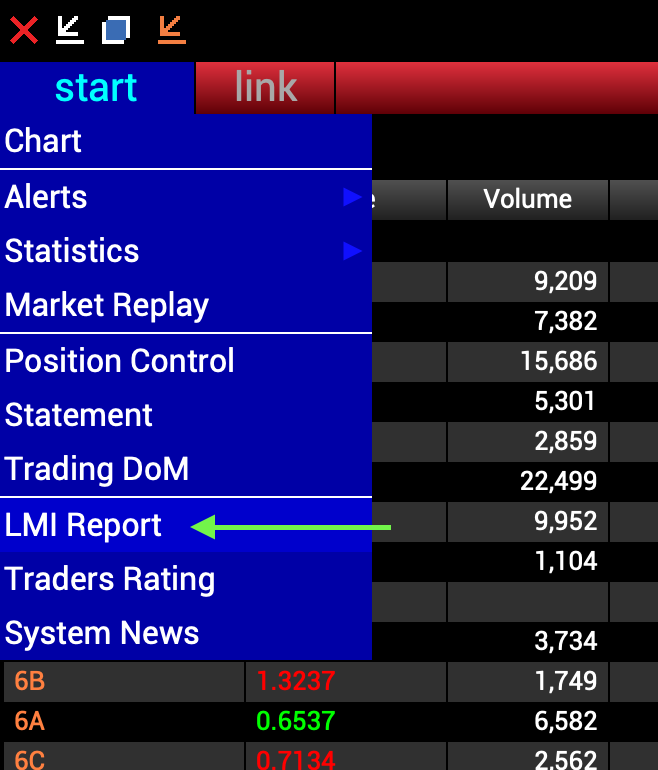
1. Open LMI Trade Report. In order to do that start VolFix app, go to Market Watch -> start -> LMI Report, the image below.
2. In LMI Trade Report choose the account you need, make sure that it is the account you want to extend and press “Extend Subscription”
3. In the pop-up window use the promo code, if you have one. More information how to obtain the code you can get here. Then press Enter or close the promo code window, then check your email for the payment link.
IMPORTANT: The payment link is valid for 3 days. If it expires, please request a subscription extension again.
Where can I see the current subscription extension price?
For the selected account size, the subscription extension is based on the current Qualifying Session pricing shown on the LMI website.
Customer support service by UserEcho